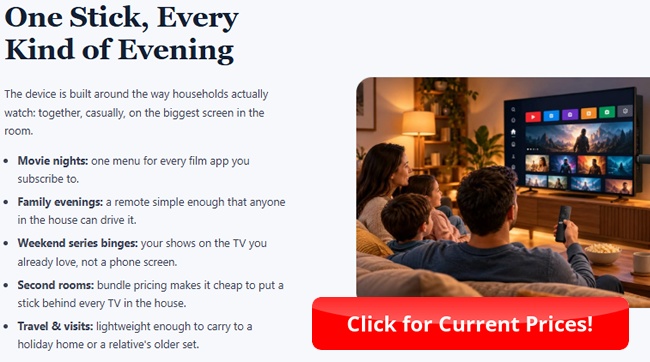
Still paying for expensive cable television when you only watch a handful of channels? Or perhaps you have a perfectly good TV that lacks the smart streaming features found on newer models.
The Boltz Streaming Stick promises a simple, affordable way to solve both problems. This compact HDMI streaming device is designed to turn an ordinary television into a smart entertainment hub without replacing your screen, scheduling an installation, or paying a monthly fee for the device itself.
According to the manufacturer, setup takes around five minutes. Plug it into your TV, connect to Wi-Fi, and access compatible streaming applications through a convenient on-screen interface.
Sounds appealing. But does the Boltz Streaming Stick really work as advertised? What do customer reviews reveal? And is it a worthwhile alternative to buying a new smart TV?
In this Boltz Streaming Stick review for 2026, Fact & Myth examines the product’s features, customer feedback, pricing, and most important claims to help you decide whether it deserves a place in your home.
The short version? Boltz Streaming Stick offers an attractive, straightforward solution for upgrading older HDMI televisions. Its biggest advantages are ease of use, a compact design, and the potential to reduce entertainment expenses by replacing an unwanted cable package with carefully chosen streaming services.
Check the Latest Boltz Streaming Stick Price and Offers
Affiliate Disclosure: Fact & Myth may earn a commission from qualifying purchases through links in this article, at no additional cost to you. This review is based on product information and published customer feedback, not personal hands-on testing.
Boltz Streaming Stick Review: Quick Overview
| Feature | Boltz Streaming Stick Details |
|---|---|
| Product | Boltz Streaming Stick |
| Also known as | Boltz Stream Stick |
| Device type | HDMI streaming device |
| Connection | HDMI, USB power, Wi-Fi |
| Television compatibility | TVs with standard HDMI inputs |
| Streaming quality | HD, according to manufacturer |
| Remote control | Included |
| Voice search | Supported on compatible services |
| Setup time | Approximately five minutes, brand-stated |
| Monthly device subscription | None |
| Advertised customer rating | 4.8/5 from 3,758 reviews |
| Starting price | $49.99 for one device |
| Multi-unit bundles | 2, 3, and 4-stick packages |
| Return policy | Advertised 30-day money-back guarantee |
Specifications, prices, and customer ratings are drawn from the supplied promotional material and have not been independently verified.
What stands out immediately is how uncomplicated the product is designed to be.
You aren’t buying an entirely new entertainment system. You’re adding streaming functionality to the television you already own.
For anyone who dislikes unnecessary upgrades, that’s a compelling starting point.
What Is the Boltz Streaming Stick?
The Boltz Streaming Stick is a small plug-in streaming device designed to connect your existing television to internet-based entertainment services.
It fits into a standard HDMI port and communicates with your home Wi-Fi network.
Once connected and configured, the device provides access to supported streaming applications through an on-screen menu.
That means an older television without built-in smart functionality can potentially offer many of the same everyday streaming conveniences as a newer model.
Why Would You Need a Streaming Stick?
Modern television viewing has changed considerably.
More people now watch movies, television shows, documentaries, and online videos through internet-based platforms rather than conventional cable subscriptions.
But not every household has a recent smart TV.
Some older televisions work perfectly well but lack the software needed to access streaming services. Others have outdated built-in interfaces that are frustrating to navigate.
Replacing a functioning television solely to obtain newer software isn’t always an attractive investment.
This is precisely the problem the Boltz streaming device aims to solve.
It provides a separate streaming interface while allowing you to keep the television you already own.
The biggest attraction isn’t complicated technology. It’s the possibility of enjoying modern entertainment without an expensive television replacement.
How Does the Boltz Streaming Stick Work?
One of the strongest selling points highlighted throughout the product information is the straightforward installation process.
According to the manufacturer, the device can be ready to use in approximately five minutes.
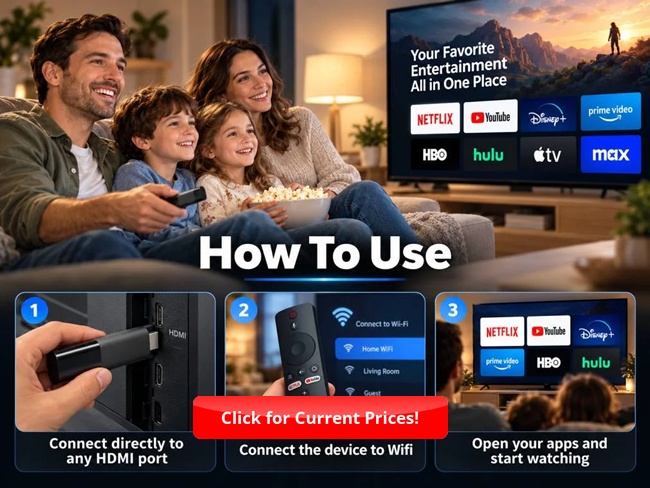
There are three basic steps.
Step 1: Connect It to Your Television
Locate an available HDMI port on your TV and insert the Boltz Streaming Stick.
Connect the USB power cable to an appropriate power source.
Then use your television remote to select the corresponding HDMI input.
There’s no need to modify the television, install internal components, or hire a technician.
Step 2: Connect to Wi-Fi
Once powered on, the device displays an on-screen setup guide.
Select your household Wi-Fi network and enter the password.
This connection allows the stick to access internet-based streaming content.
A stable internet connection is important for reliable playback, particularly when watching HD video.
Step 3: Choose Your Streaming Applications
After completing setup, open the supported streaming apps you want to use.
The promotional material references popular services such as Netflix and YouTube.
Depending on the application, you may need to sign in with an existing account or create a new one.
Paid subscription services are not automatically included with the purchase.
Once your accounts are configured, the device is designed to provide a straightforward way to enjoy streaming entertainment on your television.
No complicated installation. No new television. No monthly subscription required for the stick itself.
That’s the simplicity Boltz is selling.
6 Features That Make the Boltz Smart Streaming Stick Appealing
The Boltz Streaming Stick focuses on features that make everyday television viewing more convenient.
Rather than overwhelming users with complicated settings, the manufacturer emphasizes practical benefits that are easy to understand.
1. Upgrade Your Existing TV Without Replacing It
This is arguably the product’s most valuable feature.
A television doesn’t suddenly become useless because its built-in smart software is outdated.
If the picture remains good and the HDMI inputs still work, there may be little reason to spend hundreds of dollars on a replacement.
Boltz Streaming Stick is designed to give compatible older televisions a new lease on life.
Simply add the device, complete the setup process, and access supported streaming services.
For people who already own a television they like, that’s an attractive proposition.
It’s especially relevant for bedrooms, guest rooms, secondary living areas, and vacation properties where purchasing another expensive smart TV may be unnecessary.
2. No Monthly Fee for the Device
Monthly bills can quietly become expensive.
Between cable television, internet access, and various entertainment subscriptions, households can end up paying for services they rarely use.
The Boltz Streaming Stick offers a different approach.
You purchase the device rather than paying a recurring equipment subscription.
The stick itself does not require a monthly device fee, according to the manufacturer.
This doesn’t mean every streaming service becomes free. Platforms that charge subscription fees continue to do so.
However, the device gives users the flexibility to select services based on their viewing preferences.
For households considering cutting the cable cord, that flexibility can be valuable.
3. HD Streaming for Everyday Entertainment
The manufacturer advertises HD playback for supported streaming content.
That makes the device potentially suitable for watching movies, television programs, online videos, and other everyday entertainment.
Picture quality ultimately depends on several factors, including your internet connection, the streaming service, and the content itself.
Importantly, the supplied product specifications describe HD playback rather than confirmed 4K or HDR support.
If you primarily watch regular HD television content, that may be sufficient.
However, buyers who specifically require 4K should verify the device’s capabilities before ordering.
4. Convenient Remote With Dedicated App Controls
A streaming device is only enjoyable if navigating it feels straightforward.
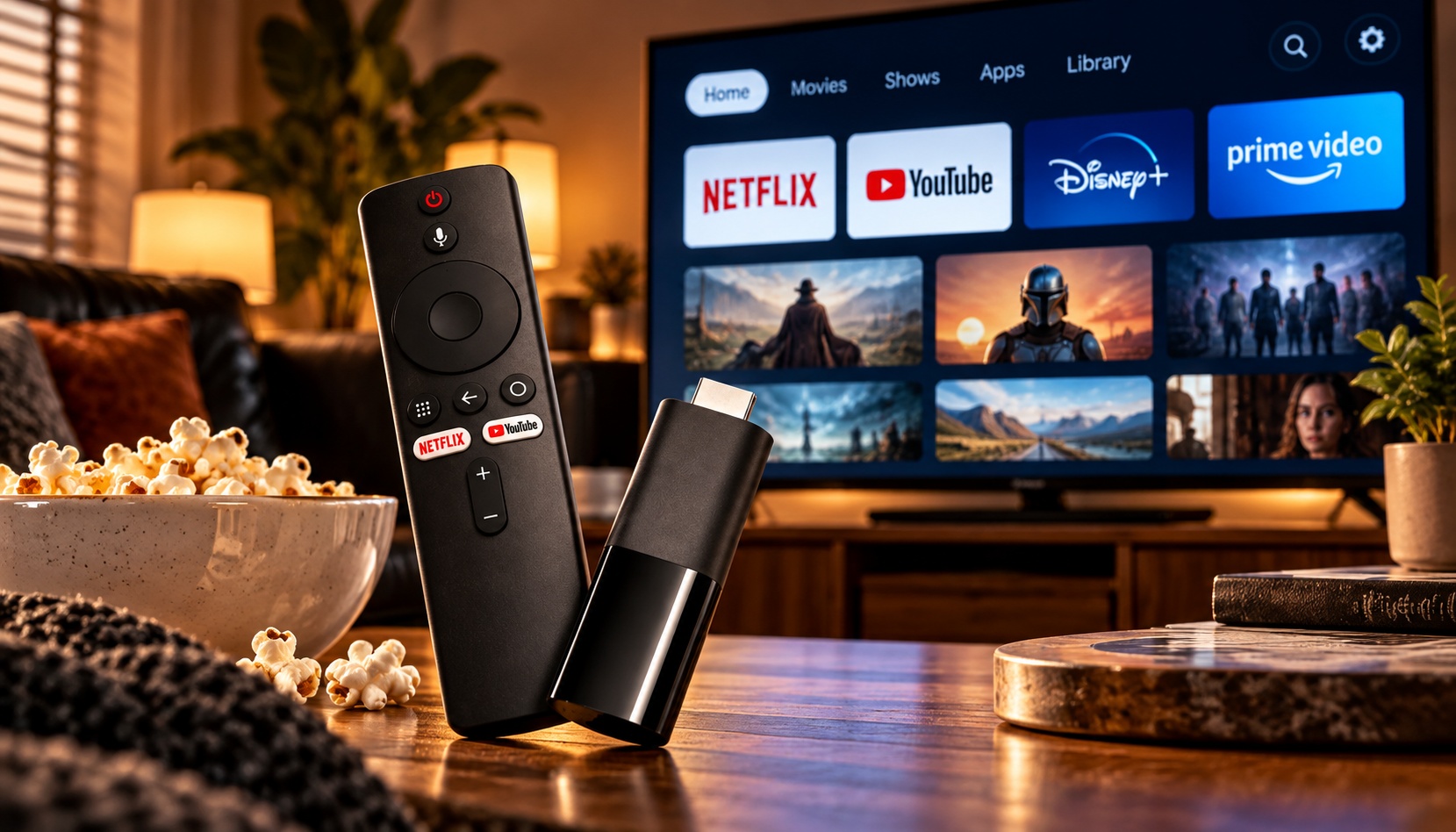
Boltz Streaming Stick is advertised with an included remote featuring conventional navigation controls, dedicated buttons for popular streaming applications, and a microphone button for voice search.
The manufacturer highlights platforms such as Netflix and YouTube among the remote’s app shortcuts.
Dedicated buttons can be convenient when you frequently use the same services.
Instead of repeatedly scrolling through menus, you may be able to reach a favorite application more quickly.
The simple control layout is also appealing for households with different generations of viewers.
Parents, grandparents, and less technically confident users may appreciate a remote that doesn’t require learning a complicated entertainment system.
Voice search functionality depends on application compatibility.
5. Compact Design That Keeps Your Entertainment Area Tidy
Nobody wants a living room filled with unnecessary electronic boxes and cables.
The Boltz Streaming Stick uses a compact form factor designed to fit behind the television.
Once installed, most of the device can remain out of sight.
This eliminates the need for a large external streaming box taking up shelf space.
The design is particularly convenient for wall-mounted televisions, smaller bedrooms, and other areas where space is limited.
Its small size may also appeal to people who want a portable streaming device for occasional use with compatible televisions elsewhere.
You’ll still need suitable USB power and internet access wherever you use it.
6. Bundle Deals for Multiple Televisions
Another appealing aspect of the Boltz Streaming Stick offer is its multi-unit pricing.
Rather than purchasing one device at a time, customers can choose packages containing up to four streaming sticks.
This makes sense for households with more than one television.
You might want one in the living room, another in the bedroom, and a third in a guest room.
The advertised price per stick decreases as the package size increases.
For families planning to add streaming capability to multiple TVs, these bundles could be an economical alternative to upgrading every screen individually.
Explore Current Boltz Streaming Stick Bundle Discounts
Boltz Streaming Stick: Fact vs. Myth
A good streaming device should make entertainment easier. But advertising can sometimes create expectations that don’t match how the technology works.
Here’s what prospective buyers should understand.
Fact: It Can Add Streaming Functionality to an Older HDMI TV
The core concept is well established.
External HDMI streaming devices are designed to bring internet-based applications to televisions without requiring the television itself to have those applications built in.
Boltz Streaming Stick is marketed for exactly this purpose.
Its compatibility with particular TV models and apps should still be checked before purchase.
Myth: Buying the Stick Automatically Makes Every TV Channel Free
No legitimate streaming stick automatically grants subscriptions to every premium streaming platform.
Boltz doesn’t eliminate Netflix subscription fees or other charges imposed by individual content providers.
Instead, it provides a way to access supported apps through your existing television.
That distinction matters.
You can reduce entertainment spending by replacing an expensive cable package with a cheaper combination of services, but the amount saved depends on what you actually subscribe to.
Fact: You Don’t Need a New Smart TV to Stream
If your existing television has a compatible HDMI input, an external streaming device can provide an alternative to replacing the entire television.
That’s one of the main reasons streaming sticks remain attractive.
Boltz builds its appeal around this convenience.
Myth: The Streaming Stick Works Without Internet
The device requires an internet connection to access streaming content.
Without adequate Wi-Fi, the streaming experience will be limited.
The same applies to virtually any streaming device that relies on internet-based services.
Fact: The Device Is Advertised Without a Monthly Equipment Charge
According to the supplied product information, Boltz Streaming Stick is purchased outright.
You aren’t required to pay a separate monthly subscription simply to use the hardware.
That’s an appealing distinction for buyers who want greater control over recurring entertainment expenses.
Boltz Streaming Stick Reviews: What Are Customers Saying?
Customer feedback is an important part of any buying decision.
The seller’s promotional material reports an average rating of 4.8 out of 5 stars from 3,758 customer reviews.
That’s a positive rating, although Fact & Myth has not independently authenticated the review database, verified-purchase labels, or individual testimonials.
Several customer accounts published by the seller highlight the same recurring benefits: easy setup, usability, compatibility with older TVs, and the ability to move away from cable.
Sarah L., Orlando, Florida: Easy Setup
One promotional testimonial attributed to Sarah L. describes successfully setting up the device despite limited technical experience.
Her review emphasizes the simplicity of the remote and installation process.
This supports one of the product’s central marketing messages: streaming should be accessible even to people who aren’t especially comfortable with electronics.
James K., Denver, Colorado: An Older TV Gets an Upgrade
Another seller-published review comes from James K., who describes using the device with a 12-year-old television.
His testimonial states:
“I thought I had to buy a new smart TV, but this stick upgraded my 12-year-old living room TV instantly.”
It’s an appealing example of the product’s intended use case.
Keeping an older television in service rather than replacing it can be financially attractive.
Emily R., Phoenix, Arizona: Simpler Entertainment for Parents
A testimonial attributed to Emily R. describes purchasing the product for parents who found their previous cable setup complicated.
The review highlights the straightforward interface.
For families interested in making streaming easier for less technically confident relatives, that feature may be particularly useful.
Robert M., Austin, Texas: Moving Away From Cable
The seller also publishes a review attributed to Robert M., who claims to have replaced an expensive cable package after purchasing the device.
The reported savings are striking, although they reflect an individual testimonial rather than independently verified typical results.
More importantly, a streaming stick does not automatically cancel a cable bill. Savings depend on actually changing or canceling paid services.
What Do These Boltz Streaming Stick Reviews Tell Us?
The testimonials consistently emphasize the same themes.
Customers say they appreciate the straightforward installation, uncomplicated controls, and ability to continue using existing televisions.
These benefits align closely with the manufacturer’s intended audience.
However, these are seller-published testimonials, not independently confirmed testing results.
They provide useful insight into how the product is marketed and what buyers appreciate, but purchasing decisions should also consider verified compatibility, specifications, and return terms.
Boltz Streaming Stick Reviews and Complaints: What Should Buyers Know?
No electronic product is ideal for absolutely everyone.
The most important considerations with Boltz Streaming Stick concern internet connectivity, content subscriptions, picture resolution, and compatibility.
Streaming Services May Require Subscriptions
This is probably the biggest detail to understand before purchasing.
The device itself doesn’t carry a monthly equipment fee, but many entertainment platforms charge separately.
If you’re planning to replace cable, calculate what your preferred streaming subscriptions will cost.
That way, you can determine whether switching will actually save money.
Streaming Quality Depends on Your Internet
Weak Wi-Fi can cause buffering, slow loading, or reduced picture quality.
This is a limitation of internet streaming generally, not a uniquely identified defect with Boltz Streaming Stick.
For HD viewing, a dependable connection is important.
4K Support Has Not Been Confirmed
The supplied product information describes HD playback.
Buyers who specifically want 4K resolution or HDR should confirm those capabilities before purchasing.
Verify App Compatibility
A streaming stick’s value depends heavily on the applications it can actually run.
The manufacturer’s material references popular services, but it does not provide a complete independently verified app compatibility list.
Before buying, confirm support for the services you consider essential.
For most shoppers interested in straightforward HD streaming on an older television, the advertised features remain attractive. The important thing is purchasing with realistic expectations.
Boltz Streaming Stick Price: How Much Does It Cost?
The manufacturer offers several packages designed for different household needs.
Based on the supplied October 2026 promotional information, the advertised prices are:
| Package | Price Per Stick | Package Total |
|---|---|---|
| 1 Boltz Streaming Stick | $49.99 | $49.99 |
| 2 Boltz Streaming Sticks | $47.49 | $94.98 |
| 3 Boltz Streaming Sticks | $44.99 | $134.97 |
| 4 Boltz Streaming Sticks | $42.49 | $169.96 |
Prices are advertised promotional figures. The seller also references an additional checkout discount that may change the total. Confirm the final price, shipping, taxes, and optional charges before completing an order.
Which Boltz Streaming Stick Package Is the Best Deal?
The single-stick package is the obvious starting point for somebody who only needs to upgrade one television.
If you have two TVs, the two-pack offers a slightly lower per-device price.
For households with several televisions, the three-pack could provide a practical balance between coverage and initial spending.
The four-pack provides the lowest advertised price per stick at $42.49 each.
However, the best deal isn’t necessarily the package containing the most devices.
The best deal is the one that matches how many televisions you actually plan to use.
There’s little advantage in buying extra hardware that will simply remain in a drawer.
Does Boltz Streaming Stick Offer a Money-Back Guarantee?
The seller advertises a 30-day money-back guarantee.
This may provide reassurance to buyers who want to evaluate the product in their own home.
Before ordering, check when the return period begins, whether return shipping is your responsibility, and whether any conditions or fees apply.
Check Boltz Streaming Stick Packages and the Latest Offer
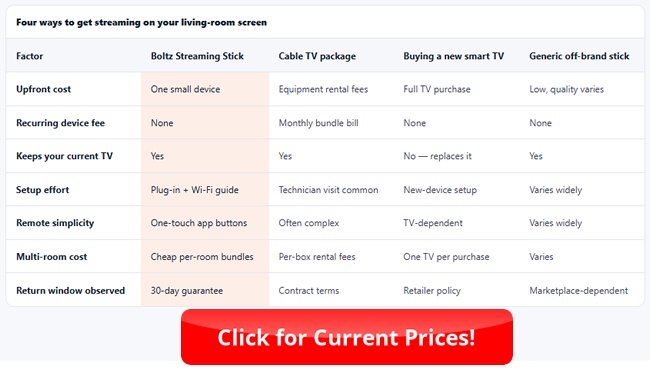
Boltz Streaming Stick vs. Cable TV and Buying a New Smart TV
The real appeal of Boltz becomes clearer when considering the alternatives.
| Feature | Boltz Streaming Stick | Traditional Cable TV | New Smart TV |
|---|---|---|---|
| Keeps existing television | Yes | Yes | No |
| Upfront expense | Relatively low advertised price | Depends on provider | New television purchase |
| Monthly equipment fee | None advertised | May apply | Generally none |
| Setup | Plug-in HDMI setup | Provider-dependent | New TV setup |
| Streaming apps | Supported apps | Provider-dependent | Built-in supported apps |
| Internet required for streaming | Yes | Depends on service | Yes |
| Suitable for older HDMI TVs | Yes, by design | Usually | Replaces existing TV |
For someone with a perfectly functional television, purchasing a new smart TV purely for streaming access may be difficult to justify.
Boltz Streaming Stick offers a comparatively inexpensive alternative.
It also allows users to approach entertainment differently from conventional cable subscriptions.
Instead of paying for a large channel bundle, households can choose streaming services according to their preferences.
The savings won’t be identical for everyone, but the flexibility is appealing.
Can Boltz Streaming Stick Help You Save Money on Cable?
Potentially, yes.
And this is where the device’s practical value becomes especially interesting.
Suppose a household currently pays $120 per month for cable television.
That’s $1,440 annually.
If that household cancels cable and switches to streaming subscriptions costing $40 per month, the annual subscription expense becomes $480.
That’s a potential difference of $960 per year before accounting for streaming hardware, internet changes, fees, and taxes.
The Boltz Streaming Stick isn’t generating that saving by itself. The saving comes from changing the household’s entertainment subscriptions.
But the device could make that transition easier by giving an older television access to compatible streaming apps.
This is a useful distinction.
You don’t need to believe in miraculous technology to appreciate the financial appeal of keeping your existing television and reducing unnecessary subscription expenses.
The most sensible approach is to identify the channels and programs you actually watch, confirm which streaming services carry them, and compare their total costs against your current cable package.
Who Should Buy the Boltz Streaming Stick?
The device is particularly appealing to several types of buyers.
Owners of older televisions: If your TV still produces a good picture but lacks modern streaming apps, Boltz offers a way to add those features without replacing the screen.
People considering cutting cable: The device could help you move toward an app-based entertainment setup with no monthly fee for the streaming hardware.
Households with multiple televisions: Bundle options make it possible to purchase devices for bedrooms, guest rooms, and other compatible screens.
Less technically confident users: The brand emphasizes a guided installation process and straightforward remote controls.
People who appreciate simplicity: If you want a compact device rather than a complicated home entertainment arrangement, the design is appealing.
However, if your TV already has a fast, reliable smart platform with all your preferred apps, you may not need another streaming device.
Likewise, buyers seeking guaranteed 4K/HDR playback should verify the specifications before ordering.
Is the Boltz Streaming Stick Legit?
The Boltz Streaming Stick is promoted as an HDMI streaming product with specific advertised features, pricing, customer testimonials, and purchase conditions.
Its basic purpose is technically straightforward.
External streaming devices are an established way to add internet-connected entertainment capabilities to compatible televisions.
The manufacturer’s promised convenience is therefore plausible.
However, the supplied materials don’t independently establish the product’s exact app compatibility, long-term reliability, or the authenticity of its published customer review rating.
So the strongest case for Boltz is its practical design and intended functionality, rather than unsupported claims that it outperforms every competing device.
For interested buyers, confirming the exact technical specifications and seller’s return conditions is the sensible final step.
Does the Boltz Streaming Stick Really Work?
The product is designed to operate as a Wi-Fi-connected HDMI streaming device.
Its advertised setup process is straightforward, and the described features are consistent with how this category of streaming hardware works.
However, Fact & Myth has not conducted hands-on testing of Boltz Streaming Stick, so we cannot independently confirm its software performance, app availability, or reliability.
What makes the device attractive is its simple proposition: keep your current HDMI television and add access to compatible streaming services through a compact plug-in accessory.
If the specific apps you want are supported, that could be a convenient upgrade for everyday entertainment.
Frequently Asked Questions About Boltz Streaming Stick
What Is the Boltz Streaming Stick?
Boltz Streaming Stick is a compact HDMI streaming device intended to add internet-based streaming features to compatible televisions.
It connects to your Wi-Fi network and provides access to supported streaming applications.
Is Boltz Streaming Stick the Same as Boltz Retro Stick?
No. Boltz Streaming Stick is marketed for streaming television and video applications. Boltz Retro Stick is a separate gaming-oriented product. Buyers should not confuse the two when comparing specifications or features.
Does Boltz Streaming Stick Work With Any TV?
The manufacturer advertises compatibility with televisions that have a standard HDMI input.
Check that your television has an available compatible HDMI port and that you have suitable USB power access.
Do You Need Internet for Boltz Streaming Stick?
Yes. You need a working internet connection and Wi-Fi to access streaming services.
Does Boltz Streaming Stick Have Netflix?
The promotional material references Netflix among the supported entertainment services and remote shortcuts.
However, you should confirm the app’s current availability and compatibility with the exact device model before purchasing.
A Netflix subscription may be required.
Can You Watch YouTube on Boltz Streaming Stick?
YouTube is mentioned in the manufacturer’s description of supported applications and remote controls.
Confirm current app compatibility before purchase.
Is There a Monthly Fee for Boltz Streaming Stick?
The device itself is advertised without a monthly equipment subscription.
Individual streaming services may require separate paid memberships.
Can Boltz Streaming Stick Replace Cable TV?
It can help you move from traditional cable television to internet-based streaming services.
Whether it fully replaces cable depends on the programming you watch and which services provide access to it.
Does Boltz Streaming Stick Support 4K?
The supplied manufacturer information confirms advertised HD playback but doesn’t establish 4K or HDR compatibility.
Buyers seeking 4K should verify the specifications with the seller.
How Much Is the Boltz Streaming Stick?
The supplied promotional pricing starts at $49.99 for one device, with lower advertised per-unit prices in multi-device packages.
Prices and discounts can change at checkout.
Does Boltz Streaming Stick Have a Remote?
Yes. According to the manufacturer, the product includes a remote featuring navigation controls, application shortcuts, and a voice search button for supported services.
Is the Boltz Streaming Stick Worth Buying?
For buyers who want to add streaming functionality to an older HDMI TV without purchasing a new television, the Boltz Streaming Stick offers an appealing concept.
Its value will depend on confirmed app support, actual device performance, and the final purchase price.
Final Verdict: Is Boltz Streaming Stick Worth It in 2026?
The Boltz Streaming Stick makes an attractive promise: you don’t necessarily need a new television to enjoy modern streaming entertainment.
And that’s a practical message in a market where consumers are regularly encouraged to replace electronics that still work perfectly well.
The manufacturer’s focus on simple installation, HD streaming, compact construction, an easy-to-use remote, and no monthly equipment fee gives the product several appealing qualities.
Its advertised multi-device bundles are also interesting for households looking to upgrade multiple televisions without making substantial purchases.
The strongest selling point is convenience.
Connect the stick to a compatible television, join Wi-Fi, and use supported streaming applications without changing your entire entertainment setup.
There are sensible considerations, of course.
Paid streaming subscriptions aren’t included, internet connectivity is essential, and buyers should confirm their preferred apps and playback requirements before purchasing.
But these points don’t undermine the basic appeal of a simple HDMI streaming accessory.
Fact & Myth’s assessment: Boltz Streaming Stick is worth investigating if you own an older HDMI television, want an uncomplicated streaming setup, and prefer keeping your existing equipment rather than purchasing a new smart TV.
The product’s claimed performance and customer ratings still warrant independent verification, but its advertised features make it a potentially useful option for the right household.
For interested shoppers, the next step is straightforward: review the current package offers, verify app compatibility, and check the return terms before ordering.
Check Current Boltz Streaming Stick Discounts and Availability
Editorial Note: This article is based on supplied product specifications, promotional information, and seller-published customer testimonials. Fact & Myth has not personally tested the device or independently authenticated customer reviews. Prices, features, guarantees, and promotions may change.